Services website templates

A sphere of different services is highly developed in most countries nowadays. Modern people can’t live without Plumbing or Electrical services as well as PC repair or Cleaning.

If you have a company which is engaged in the above mentioned market, you are able to extend your business opportunites by means of your own website creation. To achive this you are welcome to use one of the finished website templates.

All of them are of good quality and ready to use.


Plumbing – Easy Flash

Plumbing template's screenshot

Our templates afford you sound effects that can be switched ON/OFF, as you like.


Clean home – Easy Flash

Clean home theme image

Nowadays there are a lot of agencies that provide people with cleaning, tidying up, polishing and other services. But it is rather convenient to make orders online. With our Clean home easy flash template you can enjoy the service.


Electrical contractor – Easy Flash

Electrical contractor template's image

We provided also different effects so that you enjoy the navigation throughout the site. Among them you can notice sound effects that can be turned on and off, animations when the content appearance etc.
All content of the template can be easily managed and changed.


Home renovations – Easy Flash

Home renovations theme's image

Using the Home Renovations Website template, you have a special section for introduction of your services and prices where you visitors can get acquainted with the work you do and approximate time it will take.


PC Repair Services – Easy flash

PC repair template screenshot

Our PC Repair Services flash template can be easily viewed in all browsers that support flash and under different operation systems.


Look at other Services themes 

Posted in Templates' highlights|

Boutique templates – finished solution for your Boutique online presence

As many of entrepreneurs and companies rule their own boutiques, the Boutique websites are extremely of current importance.

The easiest way to create and make online visible your boutique site is to buy and customize one of the finished Boutique templates according to your needs.

There are a lot of themes you can use for your project – Fashion, Jewelry, Lingerie boutiques. They are all ready-made websites.

Look at some of them.

Jewelry Boutique html5 template

Jewelry Boutique html5 template's image


Jewelry Boutique easy flash

Jewelry boutique easy flash theme


Posted in Templates' highlights|Tagged |

New website templates

Hello dear readers.

This post is dedicated to make you familiar with the latest Tonytemplates’ website themes. All templates are our own production. They belong to different types – OpenCart, osCommerce, Html5.

You will find Music, Kids, I-Stores and other interesting themes.

So, have a look at them.


 Jewerly Boutique – Html 5 templates

The image of Jewerly Boutique template


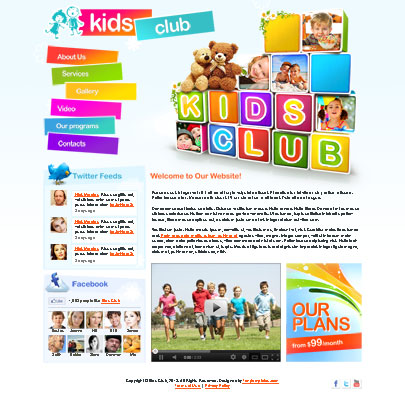
Kids Club – Html 5 templates

Kids Club Html5 template's screenshot

Radio Station – Html 5 templates

Radio Station website template's screenshot


More New templates review here

Posted on by
Posted in Templates' highlights|

Business website templates

If you are representative of a business company which needs its own website, you are welcome to review some of our products from the “Business” category. You will meet “Consulting Company”, “Broker Corporation“, Business Corporate” themes here. Templates are based on the HTML, Joomla, Flash.

Website templates from this category are of unique design, customable and nice. Review them. Perhaps you will find some appropriate design decisions for your business.

Business Corporate template

Business Corporate template's screenshot

Business Corporate HTML template can be used by various circles of customers and business owners, as this template is multipurpose.

Broker Corporation

The image of Broker Corporation web theme

Template is based on Joomla cms, which allows to edit the content and change it without efforts and deep knowledge in HTML.

Creative Business

Creative Business template's image

The most advantageous is that you don’t need to be a cool website programmer to manage the Website Template Creative Business. Here you can easily add any information you like without making much efforts.

ABC Business

ABC Business theme's screenshot

If your business area is directly associated with information technology services, our flash template deserves your attention.

Consulting Co

Consulting Co web template

Specially for those who like something unique, interesting and rememberable our team developed a business website template.

For more Business templates visit this page

Posted on by
Posted in Templates' highlights|

Music website templates – the shortest way to share your relationships with the music world

Are you related to the world of music?
For those who have an intention to create their own websites concerned with a music theme we would like to present some of our music templates.

These templates are excellent for radio stations, recording studios, sound studios, music bands, individual artists, singers. They are useful and functional.
Social media plug-ins like Twitter, Facebook are integrated into the templates. They include live photo and video galleries, where you can place a great variety of thematic images.

There are Joomla, HTML, Easy Flash, PhotoVideo templates among Music themes.

Have a look at our Music website templates.

1. Radio Station 

PhotoVideoAdmin is designed for singers who want to contact with their audience and to represent their video and audio files.

Radio station template's screenshot

Radio Station Website template – a fresh idea for your online project.

2. Recording Studio

Recording studio theme's screenshot

Current template is specially designed for professional Recording Studios. Design of the template can speak by itself by its layout, images and content.

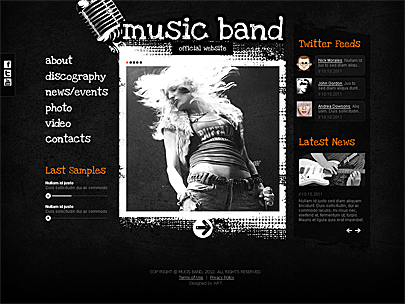
3. Music band

Music band theme's image

Music Band Website Template is based on Joomla and can be edited withous efforts. All elements of the site are well organized, so that to gather all important information on the start page.

4. Studio records

Studio records theme's screenshot

It is based on HTML which makes the template more convenient and interactive.

5. Music Artist

Music artist template's screenshot

When we are cheerful we listen to moving song and when we are sick at heart we prefer to listen to lyrical music. There are a lot of places where people connected with music: night clubs, cafes, fan clubs, musical bands, singers etc. All of them can use our Music Artist Easy Flash Template.

6. Singer Folio

Singer folio theme's image

PhotoVideoAdmin is designed for singers who want to contact with their audience and to represent their video and audio files.

7. Sound Studio

Template design puts your visitors on workplace of sound producer. It shows all features and objects of general sound recording studio. Presence of interesting flash animation makes Sound studio website template more attractive.


More about Music themes

Posted on by
Posted in Templates' highlights|Tagged |

What content is acceptable to the search engines?

Hello, dear reader!

In this article, we continue our series of publications on the subject of promotion of websites in search engines. In the last article of this column “Six essential components of using Google Webmaster Tools Service for your website promotion” we touched the main features of using Google Webmaster Tools. Today, we want to talk about the way the content should fill the pages of your site, regardless of its subjects.

So, as you probably already know, the content (text, images, infographics) – the King. In other words, the content of your site / blog is critically important in promoting resource in search engines, social networks and so on. To help you accept it as an axiom, let us draw your attention to the vision of the searching process by Google. At the head of the corner is a user who is trying to find in the Internet the information, the most relevant to his search query. So, to make this user to come to Google again the next time, he should see on the first / second page of search results those sites that correspond to the search query more relevant, but not otherwise! Probably, everyone was satisfied to find in network something that is required in a very fast way and from the first time. But not everyone suspect what a hard work is hidden behind our satisfaction with the search queries, and also having satisfied what requirements of search engines websites get the first page of search results.

Now let’s go back to the web sites / blogs, and their content. Choosing a particular phrase as a key, the owner of the resource must clearly understand what this page should contain and also imagine himself at the place of the person, who has got to the page of your website with your keyword phrase. If you search for the information that corresponds to the given query what would you like to receive? Hence the well-known among SEO experts phrase – sites for people. To put it succinctly, the pageshould contain the information on the topic, simple in understanding, with logical and easy navigation (with possibility of proceeding to other pages of your site).Now let’s talk about the filling of pages with content in terms of SEO, that is what attributes and how should be used.

Meta tag “title”

This page element is one of the most important in terms of web search! The information contained in it, indicates the search engine what content must be on the page and just here comes the search crawler first of all. Naturally, the content of the web page must match its title – the tag “title” and vice versa, the content of the tag should briefly, but succinctly express the basic idea of ​​the whole text. For example, the page of our website – “About us”. In the tag “title” basic information is contained. Its content tells the search engine that the page is an information about the company “Tonytemplates”, its services and products.

Important note – tag length should not be over 70 characters. But should not be too short – the tag “title” should be informative and specify as the searchsystem, so the users – what your page is about.The image below shows how the tag “title” is displayed to users during giving search results.

Meta tag “description”

This item is also very important for the promotion of your web page.Here you will have the opportunity to tell in details about its content. Optimal tag length – 150 – 160 characters. Very well, when this tag describes some definite advantage of your company or a particular product / service or some interesting feature – what distinguishes your website / company from others.

Important note – if the length of the tag “title” or “description” does not correspond to mentioned values ​​- it is, of course, not critical. If you exceed the limits, search robot “cuts” extra characters – that is, simply ignores them. However, since any web site is reviewed and analyzed by the search engine as a whole, then, the more pages will be defined with short / non-informative or too long / tags required cutting off, the worst impression you will make on search engines. The latter, in turn, affect the search results issuance.

H1-H6 tags

To emphasize the importance of the key phrases of the text to your pages Search engines use these tags. The most important of them is the <H1>. Most often it is at the top of the page and is its title. On one page, you should use only one tag <H1>. It is acceptably to have two or more <H2>, <H3> …The optimal length of tags <H> – to 6 words.

Important note. It is good, when SEO header contains the keyword / phrase that is also appropriate within the meaning and can be used by users / visitors of the page. For example, a page of the site http://www.tonytemplates.com/music-templates.html At the very top – relevant title <H1> – “Music”, as the page is devoted to templates of this category. At the bottom of the page – the title <H2>. It contains logical phrase “Purchase of Tonytemplates template means”.

Using bold font, and keyword density

Once, at the earliest stage of SEO, keyword density (phrases) and their allocation in the text of the page in bold were very important in the promotion of website. There were even certain norms expressed in numbers – 5-7% or 15-20% depending on the size of pages, etc. To pay attention of search engine on the presence of the keyword on the page, it was marked with bold – the more often, the better. Nowadays, due to the actions of anti-spam algorithms, such techniques have lost their relevance. To draw the attention of the search engine to the presence of the key phrases on your page, it is enough to use it inside the tag <title>, in title <H1>, in tag <description> and several times (or even one or two) to use in the text. With that bold can be used only once. The text itself should be natural and readable. If it is appropriate to use in text a certain number of keywords – that’s great, if only one or two times, also good. In any case do not customize text under certain (demanded) number of keys!

Tags <alt> and <title> of your images

What often can be placed on the web page except the text?
Of course, image. Can the images of your web pages influence search engine ranking? The answer – “yes!” It is well known, that search engine finds images thanks to special tags – <alt> and <title>.
Until recently it was thought that in the tag <alt> you need to enter the keywords / phrases to help the promotion of your web pages. With the launch of the anti-spam algorithms of the search engines, the situation has changed.
Today, for the misuse of the keys in <alt> tags you can suffer and worsen position of specific pages and the whole site. Nowadays, Google is trying to make the usage of <alt> tags in the right way and also to remind users, as well as webmasters, for what they exist. After all, it is possible to say without exaggeration that not everyone can give a correct answer to this question, and moreover fill in the content of <alt> tag. In short, <alt> tag is designed to give an idea about the image. It stands for “alternative text to the image.” Now imagine that the user does not see your picture due to some reason or another, but can read, set by you, the alternative text. Can such text fully and succinctly present and describe the image? If you want to make correct and pleasant to both search engines and users <alt> descriptions, ask you this question every time, starting to fill them.

A classic example of filling <alt> tag can be recommendation / explanation of Google. Image Description on which a little girl is playing with a kitten should be quite the same “Girl plays with a kitten.” Agree, that for user, who does not see the picture that is exactly what he needs! Even if you promote the page with thoroughbred cats, feed for them, or something else, <alt> text to the specified image must to be like this, but not name a brand or something like that!

A few words about the tag <title>

If we talk about filling <title> of images, this field can resemble a title of page – short and clear call the image.

Ok, in this article we briefly touched the main points of digestible content for search engines. Follow our future publications in the category «SEO & Promotion».

We will be grateful for your comments.

Sincerely, Team Tonytemplates

Posted on by
Posted in SEO & Promotion|

5 FAQ of Dresscode Magento

1. How to change titles of the Main and other Dresscode pages?

In admin – CMS – Pages – (click on some page Title)
For example, Dresscode Home page. Then see screen01:


2. How to translate template texts?

  • Firstly, you need to find on the Magento site package of your language. This will translate Magento default blocks, texts
  • To translate CMS pages and static blocks usefull article is http://go.magento.com/support/kb/entry/name/translating-your-store. If saying briefly, each CMS page and static block need to be created for all language via admin panel and translated in it.
  • Texts that are not translated after all actions you need to find in the Dresscode files and translated manually. For example, for the German. Write translation in view of –

“NEW PRODUCTS”,”NEUE PRODUCTE”
for example, in the end of the file app/locale/de_DE/Mage_Cms.csv

3. How to edit links and accounts in social media blocks?

      Links in social media block in the footer (right bottom) – go to the admin – CMS – Static blocks – (click on the block Title “Dresscode Footer Socials ”). There edit links or all block view (to edit all block html push the button “html” – 6). Then do all actions like numbers on the screen 03


By the way, in such way you can edit each static block.

    • Accounts of the Facebook and Twitter’re changed in eTheme – Dresscode – Theme Options – Social widgets

4. How change product image zooming in the product page and sizes of the main product preview image and thumbnail previews?

  • To change options of image zooming admin – System(1) – Configuration – Catalog (2).

Here you can arrange many parameters as you want

see screen 04

Sizes of the main product image and thumbnail previews images you can edit in the file

if cloudzoom effect is enabled –
\app\design\frontend\default\dresscode\template\ecommerceteam\cloud-zoom\catalog\product\view\media.phtml
if cloudzoom effect is disabled – \app\design\frontend\default\dresscode\template\catalog\product\view\media.phtml

5. How add own info boxes to each category in the top dropdown menu?

In admin – Catalog – Manage Categories – (choose some category – 1).
In the tab “Description” 2, 3 enter text. If you want to enter complicated information, images etc click on the button “WYSIWYG Editor” – 4. There you can even click “html” and write html code. To add images you have to load image on any server and write full link to it. For example, on our demo such path to image – 5 – http://www.ethemeuk.com/dresscode/media/category_img_1.jpg.
See screen05:

Posted in Learning sessions|

Six essential components of using Google Webmaster Tools Service for your website promotion

Hello, dear reader!

In the last article devoted to the promotion of websites in search engines – “Seo – getting acquainted with our site closer”, we discussed the importance and the necessity to add your web resource to the service of Google – Webmaster Tools. In today’s article we will focus on what useful can be found in this specified service and what to do after adding your site.

So you have successfully passed the verification and added the site to Webmaster Tools. We will briefly touch on six key points that you should understand.
At the entrance to the profile of your site you can see a summary of the status of your resource – Current Status (Current Status), which includes the “Crawl Errors”, “Search Queries”, “Sitemaps”. Additionally, in the toolbar (Dashboard) on the left, all the necessary information is in the sections or subsections of menu.

1. Crawl Errors

The first tab of Current Status panel – Crawl Errors is very important, so we go right to it and examine.

Crawl errors screenshot

On a similar chart the URL of the error is displayed – pages which give 404 server response. Less you have them on your site, better it is. Error 404 means that for the moment the requested resource is not found. This may be the case if the page with the content has changed its url address and the old address is not available, a link to the page is broken, etc. More details about 404 error and the ways of its elimination you can find in Internet, for example here –
http://www.seomoz.org/blog/how-to-fix-crawl-errors-in-google-webmaster-tools

Of course, if the number of 404 errors on the site is not great (not measured in many hundreds or even thousands) and the 404 page itself, the output for the user, is made quite informative and correct, then such errors will hardly have a significant impact on search engine rankings. However, it is important to know the cause of these errors to prevent their unjustified appearing on your site, as well as the correct and well-timed solutions.

2. Sitemaps

Another important point – sitemap files. Go to the tab “Optimization” of the left navigation menu and click on the “Sitemaps”. In this case, you will have a special page with information about the loaded from your site map. For our website the page has this look.

Sitemaps page screenshot
You can see the number of submitted and indexed pages, the last date of the document crawl by crawler. The most important – is to make sure that Google sees your site map and properly reads it!

If you have not created the map of your website in the xml format, you can easily do it with the help of service http://www.xml-sitemaps.com/, following the simple instructions. The only insignificant disadvantage of this service is the limited number of pages in the generated site map for you – up to five hundred. If your web site has over 500 pages, you can use the unlimited version just for $ 19,99.

To add documents to your site (the root directory), you need any ftp client and the actual credentials to access your resource by ftp. If you have correctly filled in the file on the site, it must be opened by the following url – http://www.yoursite.com/sitemap.xml.
In this paragraph we should briefly touch on that, what is needed for and why sitemap is so important to search engines in terms of a good estimation of your resource.

More simply, the search engines want to find quickly and view web pages of a site, not wasting time on hard accessible, deep embedded pages, and also various technical errors. For example, the page to which the link from the drop-down menu follows, can be not visited by robot for a long time, due to the fact that PS does not like these techniques that are quite comfortable for site owners and visitors. On the other hand, if this page contains important information and you want to see it in a good position in the search results, then this page should definitely be available for indexing!
Actually, for this cases we need xml sitemap, which is avoided by robot first. Moreover, Google not very good treats the web sites that do not have such file. This is a failure of its most basic recommendations.

3. HTML Improvements

The next important tab of the left navigation menu is HTML Improvements section.

Htmla Improvements page's screenshot

This section of the service is intended to draw the attention of webmasters and site owners on the comments to the quality, the removal of which can improve your web resource in the eyes of the search engines, especially Google.

Strictly speaking, it is a meta tag <title> and <description>.

Remarks on the content of the meta tag description are divided into: duplicate, long and short. Remarks on the title are divided into: duplicate, long, short, missing and non-informative title tags. By clicking on the appropriate section, you can see exactly which pages require adjustment. Already starting from the names you can see that the meta tags of your pages should not be too short, too long, or informative. In addition, the major disadvantage of your site will be duplicated tags, which often occur with the presence of duplicated pages. As we are not going to talk in detail about the rules of filling meta tags of the pages in this article, we are providing a link to the competent source, where you can learn about it more – http://www.seomoz.org/learn-seo/title-tag ,  http://www.seomoz.org/learn-seo/meta-description

Once again we want to emphasize the importance of analyzing and correcting such errors on the pages of your web resource. For example, using HTML Improvements section it is possible to reveal the presence of duplicated pages, which is not welcomed by Google!

4. Blocked URLs

The next important point of the service is Blocked URLs.

This section displays information about the file of your website robots.txt. This file is used to indicate for the search engines those pages or directories of the site, access to which should be closed for the search robots. These directories can include service folders and files of the site that do not require assessing the quality of the content, presented on your resource, but take the time to get around them by robots. Examples can include the / cgi-bin /, / assets /, / client /, / manager / etc depending on how your web site is programmed.

In addition, in robots.txt may specify the pages which are duplicates. In this case, it is also possible to use meta tag noindex, redirect 301of tag canonical. It should be noted that when dealing with eliminating duplicates the latter methods may be more effective than the robots.txt, but more difficult in implementation. More information can be found here – http://www.seomoz.org/learn-seo/robotstxt

Also in the robots.txt file it is useful to specify the path to your sitemap in xml format.

There are a lot of publications about correct preparation of robots.txt files.

5. Links to your site

The next important for any web master and owner of the resource tab – Traffic / Links to Your Site.

Links to your site page's screenshot

Everyone, even a beginner in learning the principles and rules of promotion in the search engines, knows how important for a positive outcome is the quality of external links that lead to your website. This section contains information about links to your site seen by Google.

Using the service, you can analyze and evaluate the quality of the link mass, the total number of links from one referring domain, and the number and URL addresses of your resource, to which the links from that domain follow.

Also, for convenience, all links to your website can be downloaded as a single document / spreadsheet.

6. Messages

And the last quite important in our opinion section of the Service – Messages. This directory displays the messages that are sent to the owner of the resource. If Google detects problems with indexing, during modifying the primary mirror of the site etc. you will be notified with a message.

In some cases, the reports from Google can be critical. For example, before the launch of new algorithms for avaluating the quality of sites in April 2012, all owners of Web resources that break quality standards, have been sent warning letters to relevant content. And after a while, many of these sites were penalized.

Information line about new messages is displayed on the main page of the service – “New and important”. If in this line is listed the following record – “No new messages or recent critical issues”, it means that everything is ok with the site – there’s nothing critical.

In the next articles of “SEO and Promotion” rubric we will continue to talk about the web site promotion in search engines, affecting new and already covered topics, which in this area – are a huge amount.

See you on the pages http://tonytemplates.com/blog/


Posted in SEO & Promotion|

How to add new menu in Magento Admin panel

While creating a new Magento theme I needed to move a few configuration options to the admin panel. For example I want to create an option to change a background color and fonts of a theme. This is very convenient, no need to know which HTML / CSS file have to be edited.

I’ve spent some time with Google to find a solution, have read dozens of articles. In this series of articles I will try to describe briefly the creation of new options in Magento Admin panel. In the first article we will look at the Magento architecture and will create a new menu item. This will be a dummy item, when you click on it nothing will happen.

Some theory.

Magento uses a programming template MVC. I will not dwell on this term, details can be read on Wikipedia page. The main idea of MVC – the separation of appearance, business logic and data into different parts, so that a change in one part, has minimal impact on other parts. You do not need to take MVC as a dogma, it is just a pattern that Magento development team have significantly revised. I met the name Configuration-Based MVC. At the heart of Magento a global XML-configuration file is located, that is used as the script for the Magento engine, it describes what modules are connected, what layout should be used, etc. You may say: “Keeping everything in one file is not very convenient.” So it is, this global XML is gathering from many local files. Thus, each module has a part of the configuration that is required to operate this module only. A very flexible mechanism, isn’t it?

Magento engine includes a very low level/basic functions, such as the formation of the global configuration file, modules connection, the call of controllers, pages formation. Shop functions are not included to Magenta engine. All functions of the store are made in the form of modules. They are in the app/code/core/Mage. To extend the functions we need to create a new module. Unlike modules developed by Magento, modules from other developers need to be located in the app/code/local.

That’s all with the theory, it’s time to have a practice. Lets start with the creating of module.

Creating a Module

In Google you can find a lot of articles on this subject. As I noticed, most of them – it is a smaller version of the article – http://www.magentocommerce.com/wiki/custom_module_with_custom_database_table. It contains a detailed description of the module directory structure and files. At this stage, do not suggest going into details, just download the extension ModuleCreator. You can download the add-on with MagentoConnect, read comments how to upgrade it to the branch 1.7.x. More simple way is to download the updated version here and copy to the root directory of your Magento site. To launch the extension:

  1. – Open www.youmagentostore.com/moduleCreator
  2. – Enter your login/password of administrator
  3. – Fill in 2 fields in the form: Namespace, Module
  4. – Click on create button
  5. – ModuleCreator will perform all routine to create the initial file of the module.

As a result, you should see
How to create - add new menu in Magento admin panel - screenshot of created files

List of files is pretty big. Lets understand what’s what.

What the module is built from

My goal in this article is to learn how to create a dummy menu item in the admin panel, so all module files will not be considered, we will consider only the important files

File – app/etc/modules/TonyTemplate_Blog.xml

This file reads by Magento engine and add file to the global config. Now Magento knows about our new module.

File – app/code/local/TonyTemplate/Blog/etc/config.xml

This is the main configuration file of our module (the file will also be added to the global XML configuration file). This file describes the structure of our menu section

.


With the help of <sort_order> it is possible to sort the menu items.

To create sub-elements of the menu use <children>. New elements can have arbitrary names. For example to add a new menu item Comments, you can add

As a result, you should get

That’s all with the creation of the menu.

But if you decide to delete all other files, leaving only the two described, you’ll get an error

“Fatal error: Class ‘Mage_Blog_Helper_Data’ not found”.

This is due to the peculiarities of Magento engine, it needs a helper. We don’t need it yet, so lets create an empty helper.

File – app/code/local/TonyTemplate/Blog/Helper/Data.php

So that Magento knows about helper in the module config file, the following should be left:

The archive file of the resulting module can be downloaded here

That’s all. See you in the new posts.

If you like Magento, check our premium Magento themes here.

Posted in Learning sessions|

SEO getting acquainted with our site closer

SEO iconHello, dear reader!
In the last article, devoted to the promotion of sites in search engines – “How to start your SEO campaign?”, we touched upon a semantic core of your web site, or in other words, a list of key phrases / words that can lead users / potential customers to your web resource. Today we continue to examine these issues and talk about the next steps.
Disclosing the information at once, our team is not meant to be an ideal teacher of SEO course, but only relies on our own experience in promoting resources in different markets.

So, why we should promote a site is clear, semantic core is known, what is the next?
How to please the search engines? Let’s focus on one of them – Google, conventionally defined as an Internet search leader.
First of all, make sure that the search engine can see us clearly (or cannot see at all). If the site is newly created, it is quite possible that Google robots have not visited your pages and made their opinions on the Web resource. And vice versa, if the site exists for some period and is indexed, it is very useful to know exactly, how Google indexes your site, and what to pay attention to.

In order to know which pages are already indexed, the easiest way is to use the tool “site”. To do this, open the Google search page and type in the field: “site: yoursite.com”. Please note that the “site”, a colon and the name of your resource are written without spaces. That’s all, press “Enter”. At the bottom you will see a list of pages already indexed by Google.
To make things clear, below is the screenshot of the result of this query for our website www.tonytemplates.com

Google's "site" tool using

If in response to your query Google will give the phrase: “Your search – site: yoursite.com – did not match any documents”, this means that your website is not ranked in the index of the search engine and you should take care of it quickly.

To add your site to Google, use public and free service Google Webmaster Tools. This service will open a lot of useful information and opportunities to improve your resource in terms of Google. Here should be mentioned that most of the recommendations of web sites for this search engine are also relevant to others (Yahoo, Bing …).
You can start with this page – http://www.google.com/intl/en/webmasters/#utm_source=en-wmxmsg&utm_medium=wmxmsg&utm_campaign=bm&authuser=0
Having clicked on the button “Sign in to Webmaster Tools”, you will find yourself on Enter Password page. If you don’t have your own Google account yet, click on “Sign up”.
Then follow Google recommendations.

So your site is added to Google Webmaster Tools. What it works for? 
Firstly, the search engine finds out that a new web-based resource appeared in the network (if it is not indexed yet) and put it into the queue for indexing.
Secondly, if the site is already indexed, or you awaited for its indexing, you can:
a) add site map in xml format, which is very useful
b) forbid indexing for those pages, which are better to hide (duplicated pages etc) in robots.txt file
c) find out if there are any errors of indexing of the content of your site and how to fix them
d) find out what links (internal or external) are already set/visible by search engine

Of course, above are mentioned only the main important points. With a Google account, you can read the recommendations on sites of the search engine itself, and also find the answers in the section “Help”.

Why everything mentioned above is needed? 
Every website owner should remember that site optimization is divided into two parts — internal and external.
Under internal is meant: 
1) bringing the technical side into the state, which allows search robots:
a) easily come to the resource pages and index them
b) do not waste time trying to index “problem” pages
c) easily find the content of the pages that corresponds to the search queries that were determined by the owner of the resource
2) filling up the site with “correct” content (text, video, images)

Under external optimization is meant: 
a) formation of correct and balanced linking mass
b) creation of a positive image of the website in social services from the perspective of evaluation PC reference weight and behavioral factors

Exactly in the light of the described above problems, Google Webmaster Tools service is useful.

In the next article we will examine what should be done first of all after adding the site to the Webmaster Tools service from Google.

Good Luck.

Tonytemplates team


Posted in SEO & Promotion|