Gadget Store osCommerce theme
How to increase the popularity of your online store among customers? How to raise the selling percents?
Hello, dear readers!
In this article , we continue a series of articles devoted to the promotion of web sites in search engines . In the last publication “Links – one of the most essential components of your website ranking” we talked about the links – one of the most important components affecting the visibility of your website in the network and the results of search outputs. Today we will focus on the internal contents of web sites, namely the texts for the various pages of your site.
The significance of the whole content we discussed in the article “What content is acceptable to the search engines?“. Today’s article is devoted exclusively to texts.
First, let’s take the time and attention to clarifying the question why good texts are so important for websites of any direction. Let’s start with the fact that a well-composed text of Web pages must meet the guidelines of search engines, as well as the expectations of network users coming to your page.
Very often, in web we can find the texts of pages, written without the basic ideas of proper emotional processing, and even worse, with grammatical errors. It is obvious that many of owners of web resources do not even think about the importance of properly composed page descriptions. Meanwhile, the success of the site in the network itself is more dependent on whether the texts on the pages are interesting, informative, clear and easy to read.
Why do visitors come to your pages ?
Not every site owner can give a detailed answer on this simple, at the first sight, question. And here each page should be observed separately. After all, in fact , every text has to follow a certain goal!
What tasks should perform the texts of website pages?
Let’s deal in details.
In short, the main tasks of website texts can be divided into two types – explanatory texts and selling .
All sorts of service pages of the site can explain the rules of buying, cooperation with the company personnel, etc. Product pages, services, main page and “About” MUST sell .
Let’s talk more about these two types of texts for different Web resources.
For example, you are an online store that contains in its structure such pages as “Refund policy”, “Payment methods” etc.
What users expect to see while coming to page “Payment methods”?
That’s right – a simple but sufficient explanation of the payment options of selected product. In this and similar cases, prior to composing the text, it is important to “put” yourself on visitor’s place. It is not uncommon that sometimes the obvious answer for you is incomprehensible to the simple user. The issue here is not his abilities. Do not forget that you are working within a project, and a lot of things about it are laid out on the shelves in your head long ago. Unlike you, the visitor of the page can face any information for the first time! And it is absolutely normal. Moreover , do not forget the fundamental truth – “the customer is always right! ”
If you leave anything not fully explained on the page and leave unanswered questions, do not doubt – the visitor will figure out the answers HIMSELF. And here he will rely on his experience, advice of friends and so on, these are absolutely unreliable sources.
What can it lead to? To the unnecessary loss of time when interacting with the site, company staff and even quite unnecessary scandals. Does this help to any successful entrepreneur?
Let we illustrate this, as some examples .
Let’s take a look at the page of the famous online store LLBean – “Product Recall Information and Assistance”
This page is devoted to the information about the rules and return policies of certain items purchased from the vendor. The text under the heading has only 106 words, which clearly deliver very and very important information for buyers. Visitor can easily understand if the information concerns directly him, and what should be his next steps, if it’s important.
Another example is the page of the store amazon.com – “Find a Missing Package“.
This page explains the users how to find your lost and unreached products.
Just want to emphasize the presence of an accompanying graphic, which makes the page more attractive and easier to understand. On this page, like on the previous one, just a few words are used for sufficient and simple explanation of the options for the client of the company.
Well, we believe that the point is clear and suggest to move forward.
Frankly speaking, the majority of web pages of commerce sites has (or should have) selling texts. In fact, each page must sell something. In this case is meant – to promote the sale or qualitatively characterize and recommend something.
If the card of goods in the shop is meant, the text posted on this page should present the product in favorable light with its characteristics and the seller’s warranty and price.
If we consider the text of a page of a service provided by the company, such description should again briefly but succinctly indicate the possibility of service in terms of solving customer’s problem. The so-called “sale price” is mandatory.
It should be noted that this approach to the texts composition is based on the techniques of copywriting and according to one classical interpretations implies the following requirements:
In more details about copywriting techniques we will talk in the next publications, and now, as an example will offer to have a look at the text of the product page “Radio Station website template” Internet store web templates.

We should pay attention again to the short, but line by line description of the product possibilities and attractive for potential buyer headlines.
Let’s take a look at the page “Affiliate Program” well-known on-line store for the delivery of bouquets of flowers.
What sells this text?
Of course the affiliate program for all, who wants to work with a flower shop ProFlowers ®
The text contains graphics, progressive list of benefits and “call to action” ! Everything – briefly, succinctly, tastefully and easy to percept!
To show what can be the content of the page “About Us” or “About Company” we give an example of our own page “About us“.
Running ahead, lets say a few words about the widespread versions of these pages.
Unfortunately, a lot of owners of web resources fill the page “About Us” with brief (and not too much) biographies of enterprises, an impressive lists of achievements and so on. In fact, based on the experience of professionals in online marketing, we can say with confidence – the page “About Us” also have to sell !
What this page can sell?
Of course the company itself, but rather the benefits from the potential customer interaction with it within the purchase of products, order of service, etc.

In this example, all the information is provided via graphics.
We have touched the recommendations on preparing the correct texts for your web pages. But do not forget about the search engines that are able to do a good service to the owner of the site, leading to his page steady enough traffic of visitors – potential customers.
What do the search engines want from the texts of site pages for their high rankings?
Here we can talk about what the search engines want and do not want to see on the pages of the site.
Necessary
That’s basically all the same as for the “sell” and “explains ” texts . Among SEO attributes we can specify that you should have on the page header <H1>, attributes <ul>, <li> for row-by-row characteristics, making literate <title> and <description>, alt descriptions of pictures and presence on the page a minimum number of keywords / phrases. Please note – not maximum, but minimum ! Or, more than the minimum, but the only appropriate in the context.
Invalid
Here we should mention uninformative, non-unique, non-bearing semantic load texts, especially if they borrowed on other sites.
It’s not a secret that today search engines can well read texts of pages and are able to give them a proper assessment. If the text contains a lot of keywords, constant mentioning of the name of the company and the statements that it is the best, such text for sure will get the lowest score.
For more information about the correct filling if meta tags, alt descriptions, etc read our publication “What content is acceptable to the search engines?”
Well, good luck in writing your pages and great commercial success!
See you on “SEO & Promotion” pages
Tonytemplates team
Hello readers.
Today we have an intention to make you familiar with some of our products, which were the most popular between visitors of tonytemplates.com on September.
They are HTML, Joomla, Magento themes.
So, look at them.


What do you expect from website template? What benefits you want to receive for your business? Of course, the main aim is the popularity among clients and good income. Our Jewelry Boutique Website Template will help you to get all these!
First of all we suggest you the template which is compatible with different browsers and mobile devices, as it is based on HTML5. It is fast and very convenient in usage, with it you do not need to take care of Flash version and support.

The template can be used by Jewelry shops, collections of different jewellers etc. It is easily customized and managed without deep knowledge in coding and design.
Jewelry Boutique Website Template consists of 3 main parts: the Main Menu block, which is located on the left side of the template; the slider with jewelry samples, which occupies the central part of the template and the catalog, which is also put into vertical slider.
Simplify your way to success with our ready-made Jewelry Boutique Website Template. You will find out what means great quality and professionalism.
We glad to greet our readers on the pages of this blog.
Today we have an intention to continue speaking about OpenCart – the unique open source shopping cart system. In our previous article “How to make a translation of a website with the new OpenCart theme installed” we told you about translation of your site based on the OpenCart. At this time we would like to talk about another important question – how to get manufacturers carousel module in Opencart.
So read below.
Carousel Module (slider with brands) is originally installed in the default OpenCart version. You can see it in the bottom of main page:

If you’ve installed your own theme and don’t see this block, you need to install it in admin: Extensions -> Modules -> Carousel.
The next step is to add your own manufacturers, because for now there are only default brands. You should go to admin -> Catalog -> Manufacturer -> Insert to do this. For example,

After that you have to set this brand to some products on your site.
Go to any product’s editing page in admin: Catalog -> Products. We do this, for example, for default product “Apple Cinema 30″”. Tab “Links” and first field “Manufacturer”. Now type the first letter of your brand’s name and choose the brand:

As a result at least one product will have your new brand “Hugo Boss”. You can see also that this brand’s appeared on your storefront – link: http://your_site_link/index.php?route=product/manufacturer (you can find this link in the default OpenCart template in its footer menu -> title “Extras” -> item “Brands”)

When you click on it, you will see all products with this brand. There is only one product in our example. You should save this link. (for example, index.php?route=product/manufacturer/info&manufacturer_id=11). It will be helpful for us later.

So you have added the new brand. You have completed the addition of the product to it. But, nevertheless you don’t see this brand on your main page in the slider with brands. All images will be the same, even if you refresh the page for many times. The reason of this condition is the work of Carousel Module with the definite banner (in the default case with the banner “Manufacturers”).
In order to see your own image in the Carousel Module you needn’t to add a new brand in the admin only. You should also add this brand to the one of default banners or create your own banner.
We would recommend not touching the default banners but creating your own one. In this way you will always be able to come back to default settings, if something get wrong.
To create a new banner, go to admin: System -> Design -> Banners -> Insert.

Now you need to paste the link, which we recommended you to save, into the field “Link”.
New banner is completely done.
Finally, you should set this banner in Carousel Module. Go again to: Extensions -> Modules -> Carousel ->. Choose the new created banner in the field “Banner”. Come to Frontend where you can see the one new brand “Hugo Boss”. When you click on this image, you will see the product with this brand. The same procedure has to be done concerning each new brand.
So we wish you not get tired when adding new brands to your OpenCart theme.
See you later on the pages of the “Learning Sessions” rubric.
Tonytemplates team
Hello dear readers.
Today we would like to announce that our Shopomania magento theme was successfully accepted at www.magentocommerce.com/magento-connect
Now the Magento community and all interested in Magento premium themes have an ability to get acquainted with the product’s advantages at the official Magento website.
The theme is available here – http://www.magentocommerce.com/magento-connect/catalog/product/view/id/19678/s/shopomania-premium-responsive-theme-8250/
Hello dear readers!
Today we would like to pay your attention to the web templates that are best sellers at our shop. They belong to different cms, template categories. Whatever the case, they are the most popular between our clients and deserve your attention.
Look at them
Current template was designed specially for renting services.

We offer modern website with unique layout and design.
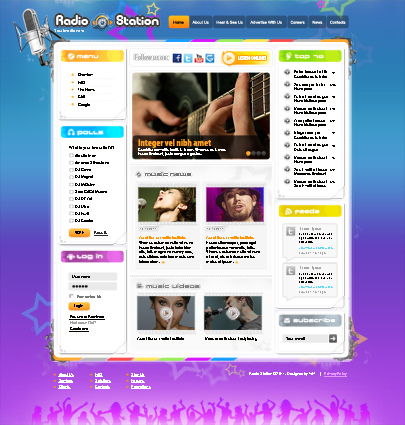
Header consists of Radio Station logo and frequency. The central part of the template belongs to the interior image of radio station office to transfer the whole atmosphere of musical place.
Radio Station Joomla 3.1 template

Radio Station Joomla Template contains slider banner with bright images that are changed automatically. Under this banner Music News block follows.

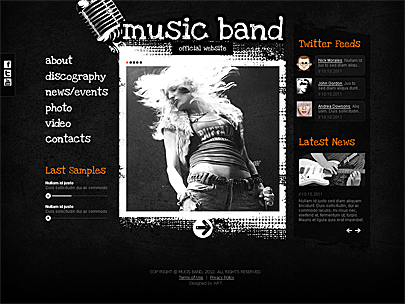
Music Band Website Template is based on Joomla and can be edited withous efforts. All elements of the site are well organized, so that to gather all important information on the start page.
Electrical contractor Easy Flash

We provided also different effects so that you enjoy the navigation throughout the site. Among them you can notice sound effects that can be turned on and off, animations when the content appearance etc.

These easy flash templates can match any plumbing agencies, services, companies or organizations working in such industry. They help to eliminate any problems with water pipe in your house and provide you with full comfort.
Shopomania osCommerce template

Shopomania Oscommerce theme uses html5 and css3 technologies. Also different UI widgets like Facebook and Twitter are already integrated.

Joomla based Rent Car template
The most common task you usually face with after installation of some new theme on your website is the translation of the whole site and particularly your theme.
First of all, for sure, you should find translation package of default OpenCart template on your language. It can be find on the official website – http://www.opencart.com/index.php?route=extension/extension. Here you need to enter version of your default OpenCart and language. Download your package and upload all files to your site.
Only after all files are uploaded you can start to make settings in the admin panel.
As usual you can see settings directly in the extension page or in the documentation as for each language package. (see screen №1)
Screen 1.
All these changes are to be done in the admin -> System -> Localization -> Languages. Click “Insert” button and write all parameters just as in the documentation (see screen № 2).
Screen 2.
In the case you downloaded a language package with translation of front end and admin panel, you can set your own language in the admin panel. Do this in System -> Settings -> Local. Your required language can be selected from the dropdown list (see screen № 3).
Screen 3.
All default texts are translated to this moment. But as for texts that are added by developers in a new theme additionally, they are not translated. So, you have to do this manually.
You should open folder: \catalog\language\english\ In your theme files. All files that you see there need to be copied in folder with other new language installed – \catalog\language\your_new_language\.
For example, for German:
Screen 4.
You can translate all these files prior to uploading. Create the folder \catalog\language\de_DE, copy all files from \catalog\language\english\ there. After that translate them and upload to your site.
To translate language constants: open file, for example, \catalog\language\english\common\header.php. All constants you see in view of:
$_[‘text_home’] = ‘Home’;
Don’t touch left part of equal sign, you should change only words in right part of constants. So, you can change the word Home to your own translation.
Some themes, such as \catalog\language\english\common\header.php, \catalog\language\english\common\footer.php etc, do not change files from default OpenCart theme. They may contain only folder \catalog\language\english\module to translation. This makes your translation process easier and more quick.
Plumbing Website Template can offer you profitable solution for your online projects. You can realize all benefits and beauty of Flash templates on your own experience. We combined fast response and behavior without suspension, clean code, compatibility with various browsers and operation systems. Advanced technologies will help to make your business successful and to attract more users by original and accessible navigation.
The main idea of the template is to present a Main Menu like cards with photo and text. Just simple and effective, as with the help of the images you can view the main idea of the sub-page.
You can easily save your money and time. Why our prices are so accessible?
We want to please our clients and to give more abilities to get acquainted with our work. You always have a choice what templates to select for your site and we hope that you will be inclined to our side. Plumbing Website Flash Template is now accessible both for small and big companies. Don’t lose your chance!
Good day, dear readers!
Today’s article continues a series of publications dedicated to the promotion of your websites in search engines. In the last article, “What content is acceptable to the search engines?” we discussed the importance of the content hosted on your pages. An equally important component of success in promoting your site in the search engines is link mass concentrated in and around the site.
So, let’s discuss in details.
In the last article we talked about the fact that the quality of the content of your pages is very and very important when evaluating search engines. There are many owners of website resources that neglect it. On the other hand, a lot of webmasters and site owners are trying to make their page unique and interesting for visitors (and thus for the search engines). But how search engine can compare and evaluate the quality of the two sites with a similar premium content? Which one to put upper in the search results?
Just to resolve such issues, once the search engines have adopted the tools of quality assessment and the number of links leading to web sites, as well as internal links, going from page to page within the domain.
Let’s talk about these two types of links – internal and external links.
Internal
What do they most often serve for, and what are they?
If the site is done for the people, its pages contain a structured and consistent information, it is quite natural when one of them is associated with any other word or phrase. To be able to proceed easily and rapidly to the desired content an active hyperlink is put, as mentioned above a key word or phrase serve as a link text.
For example, take the main page of our web site.
At the bottom of the text is a link to, logically related to the main web page, “About us”. Who really wants to know more about the company will be able to easily move to the content of the site.
These internal links are useful for both users and search engines. After all, the Google robot, passing the text of the main page, will run into a link too and will be able to go to the page of the company. Further, if the new page is interesting in its content and SEO meets the basic requirements, as a plus, the master or owner of the web site will have one more good in terms of SEO page content. The more pages, the better!
What internal links may be bad in the vision of Google?
The basic answers to this question are the following:
– broken links
– links which include spam in their anchors
Broken links
This is the links with the help of which you cannot navigate to the required page for technical reasons. About 404 Error and other URL errors you can find out from the manual for web masters (Google Webmaster Tools) and many other sources, for example, http://moz.com/blog/how-to-fix-crawl-errors-in-google-webmaster-tools etc.
Spam anchor links
In this case we are talking about the excessive tendency of some web masters to bring to the greater weight of ranking pages, promoted by certain commercial needs. In such cases, high frequency of the use of key phrases on the page, including link text, looks intrusive, unreadable and, of course, Google does not like it.
As an example we can take the page of our website “Music”.
In the upper part of the text, over the pictures of websites templates, there is text including the keyword “Music”. The key phrase, according to which that page is optimized, “Music website templates”. More about these products – it is a link that leads to the page for a more detailed description. Option anchor text of the link “More about Music website templates” could be treated by Google as spam.
If your page uses the internal links with exact match of keyword phrases, to which the web page is optimized, it can be treated as spam and have appropriate consequences.
Inbound
What if, as they say, internal relinking (links within a domain) works well, inbound links coming into your site, are crucial in promoting.
Let us briefly analyze, what links, from what sources can come to your site, and what in today’s vision of Google are organic, and which on the contrary – can make harm to your resource. Lets specify at once, this article is not intended to provide detailed recommendations for link building. Getting inbound links to the site – another big, if not huge, topic that requires in-depth study. In this article, we aim to highlight only the key points and to encourage readers to think well before putting some links leading to their resource.
Recent algorithms of Google, oriented on fighting with unnatural links, allow to turn the efforts of web masters and site owners to the right link building techniques. What has been done and brought fruit earlier, today is unacceptable.
Lets touch a little just those methods that may be well known to you, and which were used earlier.
Often unnatural (inorganic) links were set by SEO optimizers, using all sorts of good and affordable ways. These experts (and often absolute amateurs) saw their main task to put down as much as possible links to the promoted website from any pages of any websites, resources and directories. In addition to this, it was considered a very important task to use keywords and phrases in anchor links.
What methods and links are talked about?
Let’s talk about a few of them in brief.
1. Web directory of sites with free addition
These web resources, which consist of a large number of sites on their list, offered (or offer it now) absolutely for free to add your website to the directory, including an active link to it. It seemed, what could be easier and better? The more these resources, the more inbound links to your website!
But more recently, such references are not just useless, but also lead directly to the spam filter of Google.
As an example of these directories such sites can serve http://lazysubmit.com/, “http://www.freedirectorysubmit.com/” http://www.freedirectorysubmit.com/
2. Placement of SEO-articles in unspecialized directories
Promotion of articles until recently was considered one of the most loyal “white” SEO optimization techniques. As written by you or ordered from copywriter unique article “had every right” to contain two or three active links with the keys in the anchor text and to lead to promoted pages of your web site.
Today, the promotion with articles is still one of the great ways to earn inbound links. However, there are some adjustments in the evaluation of the quality of those links.
Firstly, it is inappropriate to place (of course unique) an article in general not specific catalogs of articles. It is better to give preference to senior level, specialized and highly visited sites, where registered users are offered a lot of options, one of which is the placement of featured articles.
Secondly, it is necessary to be very careful with exact match of anchor text and promoted key. The most natural option would be to write at the bottom of the articles the word “Source” and to set the active link to the page on your site containing the full text.
Thirdly, it is not necessary to post the same article in several places. In order to build up a reference weight naturally, it is best to place articles at several reputable sites, so that each new will be in a new place.
And, of course, remember about the guest posts in the popular, topical blogs. This technique is the most “white” and recommended.
Today Google evaluates much higher those links, which are not very easy to be placed. This is what guest posting implies. This is clear – any blog owner will agree to host only high-quality resource, relevant article, corresponding to all his requirements.
3. Spam blog comments
One of the favorite and very simple techniques to get links to the site, until recently, was leaving comments in blogs. After all, the majority of blogs allow to leave comments with a signature for free. Text of signature – is an anchor of the link that leads to your web site. Again, it was very easy to write a sentence of three or four words and get a link back. For example, “Great post. Thank you. ”
In addition, many SEO specialists have entered into anchor text the keys of promoted pages – “The best lawn-mowers in Illinois.” It turned out that the comment was left not by a particular person, but by the best lawn-mowers …
Today, this technique leads to a spam filter of Google!
Can I leave comments in blogs to get backlinks? Absolutely! However, there are a number of simple and clear suggestions on how to get backlinks and not to be punished for it.
The size and relevance of comments.
Naturally, the comment should relate to the publication, and should not consist of a single sentence. In order to leave a normal comment, you should at least read carefully the publication itself.
And do not forget that most of bloggers do not want to put a direct link that does not contain the attribute nofollow, to site with PR lower than 1-2.
Useful links
If very briefly touch upon the question of what kind of links should get the owners of website resources, lets pay attention to the fact, that Google tends to draw the attention on, introducing new algorithms to assess the quality of websites and links.
The main criterion of quality is the naturalness of a hyperlink leading to the page of your site. Just to make a long story short, evaluating each link leading to your website, it is worth considering whether it appeared naturally or was set specifically for the search engines.
If you had to find among common link mass of your website hyperlinks, that you did not set, but it was done by other people, who liked something out of your content, pay attention to them. This is the most natural links! The only thing that requires further evaluation – is the quality and credibility of the web resource, which decided to refer to your content.
For more information about these and other issues of promotion of your web site, see the following publications of “SEO & Promotion”.
| M | T | W | T | F | S | S |
|---|---|---|---|---|---|---|
| « Mar | ||||||
| 1 | 2 | 3 | 4 | 5 | ||
| 6 | 7 | 8 | 9 | 10 | 11 | 12 |
| 13 | 14 | 15 | 16 | 17 | 18 | 19 |
| 20 | 21 | 22 | 23 | 24 | 25 | 26 |
| 27 | 28 | 29 | 30 | |||