Five important reasons that are worth your attention, when choosing a template of the future site

Good day, dear reader of “Presale Suggestions” rubric.
Today’s article continues a series of articles designed to help the future owner of the Website to make the right choice of ready-made template and optimize it for your own needs and ideas.

In the last article “Five important criteria for choosing a website template. What you should know about ready-made design solutions” we talked about the navigation, flash- banners, indexing of website based on the template made ​​by search engines.

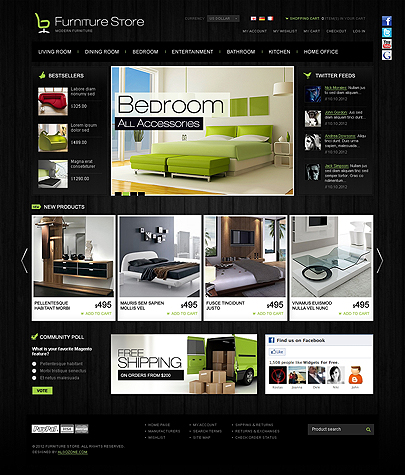
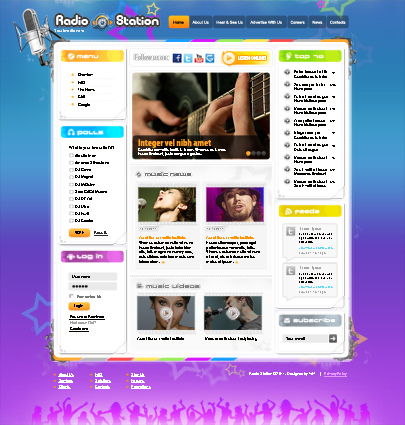
The picture of the main page of website based on ready template

Today we suggest to continue the conversation on the subject and touch the other five criteria for choosing a template, which, like others that were mentioned in the previous article, deserve close attention .

So, together with those, who are serious about their future choice of model for web resource we will continue exploring those nuances of templates or themes, that are clear and prominent for experienced web master and hidden at first sight for the beginner.

Posted in Presale Suggestions|

3 quick steps to create your own theme in cs-cart-4.0.3

Hello readers of the rubric “Learning Sessions”.

In the last article “How to make your own filters and show them on your site in the OpenCart” we talked to you about filters implementation in the OpenCart.

Today’s CS Cart theme tutorial is devoted to the topic of own theme creation in cs-cart-4.0.3

Ok, read some pieces of advice below.

The first thing – don’t make changes in the basic theme. If you do some incorrect changes, they can go to the core files of the whole template. Thus you will have problems with recovering the whole your site. If you clone basic theme and something goes wrong with your custom theme, you can always delete this theme and clone basic theme again. The same procedure has to be done with layout and theme presets.

1. Clone Basic theme

So, first of all you should clone basic theme in admin: Design -> Themes -> press Clone theme.


The screen of the program - CS Cart theme tutorial

The screen - Clone theme big

In the window write name and press Save. After this your custom theme will be automatically displayed in the Front End of your site.

Posted in Learning sessions|

Music website templates – fast and simple embodiment of your music world online projects

Hello friends.
This post is to present to you some of attractive web design solutions concerned to the bright world of music.
This field of the human life is exciting and colorful. Of course, the design of your future music website should be respective also.

If you belong to the world of music, you have good chances to find proper design solution for your own needs between finished music templates.
They devided into some sought after categories – Radio Station templates, Sound Studio templates, Recording Studio themes …

They are presented to your attention below.

Sound Studio Easy flash theme

Sound Studio Easy flash template's screenshot

Presence of interesting flash animation makes Sound studio website template more attractive. Website based on this template isn’t just an online visit card, it will convey the inner atmosphere of recording studio.


Singer Folio Photo Video template

The screenshot of the Singer Folio website template

The advantages of the website template Singer Folio Photo Video Admin include an attractive design, simple management, high storage of audio and video files.
When you open the website, you hear a nice music that catches your attention right away.


Radio Station Easy flash theme

Record room is the central part of our template. The title is emphasized by the Wireless Network icon. Microphones, monitors, headphones and poster deliver the atmosphere of radio studio.

Posted in Templates' highlights|Tagged |

Five important criteria for choosing a website template. What you should know about ready-made design solutions

Hello, dear readers !
We start a new section in our blog – “Presale suggestions”. Here we will try to guide you in the right direction when selecting a product, the most suitable within your future online project.


The screenshot of ready-made website template


Today’s article is written for those, who are on the step of solving the problem of creating your own web resource.
If you want to create a website quickly, using ready-made pleasant design solutions, web templates, the variety of which is growing every day, will match your requirements ideally.

Is it even possible to succeed in the Internet project using the site based on the ready-made template?

For those, who takes such phrase with a skeptical smile and just for all those, who are interested, we can confidently say, ” Yes, it is! “.

Such an assertion is based on the considerable experience in the area of web development. We are watching with pleasure successfully operating sites in the network, which are built on the basis of our own, and not only, templates.
Nevertheless, we are not going to campaign for such decision, and will just try to help those, who have definite intention to buy a ready template for website, consider some of the nuances when choosing the right product.

Things to remember, when choosing a ready-made website template

In fact, it is necessary to know that a particular template may impose significant limitations in the functionality of the future website. Proper understanding of the goals and objectives of the future web resource together with the knowledge of a particular template capabilities will help you avoid further frustration and unnecessary expense!

Posted in Presale Suggestions|

Best templates of November

Hello.

Today’s post shows you what templates were the most popular between our customers during November. They are devoted to different spheres – Fashion, Radio/Music, Electricity. They are Flash, Html, Html5, Magento templates.

Look at them.

Radio Station Html5 template

The screenshot of the Radio Station web template


 Shopomania magento theme

Shopomania magento responsive template's image

Radio Station Joomla

The main page of the web theme Radio Station Joomla


Posted in Templates' highlights|Tagged , |

Online Fashion Boutique Magento template – short review

Magento templates are now very popular, as most of e-commerce solutions are based on Magento engine. We present you our one more design idea for online stores – Fashion Boutique website layout.


The image of online boutique magento template


The Main Page contains fashionable slider with attractive images, on the right side and at the bottom there are carousels with the store products. If you proceed inside any category, you can notice that the Categories tree is located on the left side of the screen and the products assortment is listed as the main content of the page.
A lot of images and products representations help the customer to see the assortment from the first entrance to the website.
We offer quite reasonable prices for our customers, so the professional design becomes more and more accessible.
Fashion Boutique website layout is a simple solution for your store, as it can be easily integrated into your website and customized with appropriate styles.
Choose our template and enjoy real quality of service.
Posted in Templates' highlights|Tagged |

How to make your own filters and show them on your site in OpenCart

Hello.
We continue to publish articles, which are devoted to the OpenCart ecommerce platform.
In the last one “How to add new brands in OpenCart. How to add brands to carousel module” we talked about brands and carousel module. Today we want to share with you some information concerning implementation of the filters.

Ok, let’s start.
Opencart Filter module has appeared from version 1.5.5.1. So, keep in mind, that if you need this module, it would be right to update your site.

What is the reason of using filters in general?


The most important thing of this is usability. Web sites can have hundreds of products with the different range of prices, sizes, colors etc. If a visitor enters your site and sees such variety of products, he/she can be boring of sorting page, scrolling it down and, as a result, be inclined to leave your web resource.

On the other hand, if the user sees filters, he/she can only set some parameters of search by filter (for example, price and size) and find what he/she needs in a quick manner. In this case he/she doesn’t need to scroll all products and see price and size in each of them.

When you install the default OpenCart template for the first time, you can’t see Filters, because you have to create them by yourself.

Well, let we tell you how to do it.

Firstly, you need to install Module Filter.
Installation procedure is the same as for other modules. Go in admin: Modules -> Extensions -> Filter -> Install. In our example, we will add Filter in the left column on category page.
So, choose: Layout: Category, Position: Left.


Category small - OpenCart program screenshot

Opencart filter module installation

Ok, the Module is installed, but you can’t see it because it is empty. There are not any filters on your site yet.

Posted in Learning sessions|

New Kids Fashion magento theme was presented at the Magentocommerce

Hello.

Today we want to announce that our next magento product was successfully approved on the Magento website.

The product is devoted to the Kids Fashion Stores and has all necessary features.

The image of the Kids Fashion magento extension

You can get acquainted with the all features of the product here – http://www.magentocommerce.com/magento-connect/kids-fashion-theme.html


So be familiar with the most world popular online stores solution – Magento by reviewing different Magento themes.

Good luck!

Tonytemplates team


Posted in Announcement|

Best themes of October

Hi all.

Today we present to you some of the best website templates that were most popular between Tonytemplates’ clients in October.

So look at them.

Perhaps some themes become the ideal web solution for your future project.


ABC Business Easy Flash template

The image of ABC Easy Flash template


Shopomania Fashion Magento

The image of Shopomania magento template's main page

Rent Car

the image of Rent Car HTML template


Electrical Contractor

Electrical Contractor easy flash template's screenshot

Posted in Templates' highlights|

How to install Joomla Computer Repair website template of 3.1 version

Hello dear readers.
Today we begin to publish a series of articles devoted to installation and optimization of a website, which is created on the base of the finished template “Computer Repair Joomla 3.1”

Let’s start with the installation

The instructions, which are given below, describe the installation of the Joomla and the website template itself.

Ok. We should find the “Readme” document in the zip that includes the template’s files.

Screenshot of Readme file

Open the text and read the instructions that are referring to installation and editing.
We should, according to the first item, upload the archive with the Joomla 3.1 from the official website www.joomla.org

The downloading Joomla web page screenshot

Upload the archive by click on the shown link.
After that we should upload the archive to our server and unzip it.

Let’s illustrate this with an example.

We create a new folder “Computer_repairJoomla3.1” for our future website. It is actual for our case, since we will upload the Joomla3.1 files and the template’s files on the test server.
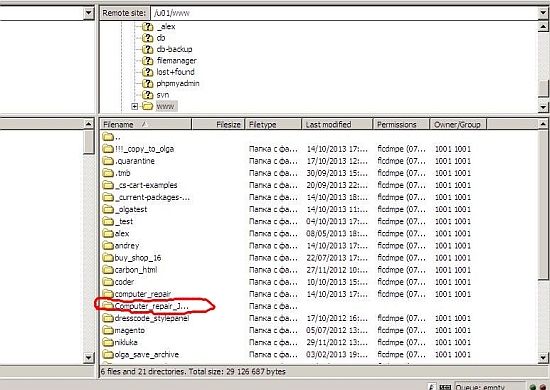
New Folder Creation for your Joomla files

Now we upload the Joomla_3.1.5-Stable-Full_Package zip archive to our folder and unpack it with the help of the File Manager.


Unzip_small

Unzip_big

Now we should install Joomla.
To do this, go to the browser’s url address of our future site. In our case it is http://dev3.tonytemplates.com/www/Computer_repair_Joomla3.1/. We will be redirected to the Joomla installation web page.

We should leave all the default settings except for one. On step “Database configuration” set value “jos_” for field “Table Prefix”.
Now we have the default Joomla theme installed.

After that we will install the “Computer Repair” website template.
For this we need the contents of the folder “Template Source”, which is located in the zip archive of the template. Upload it to the server with the choice of “overwrite” option.

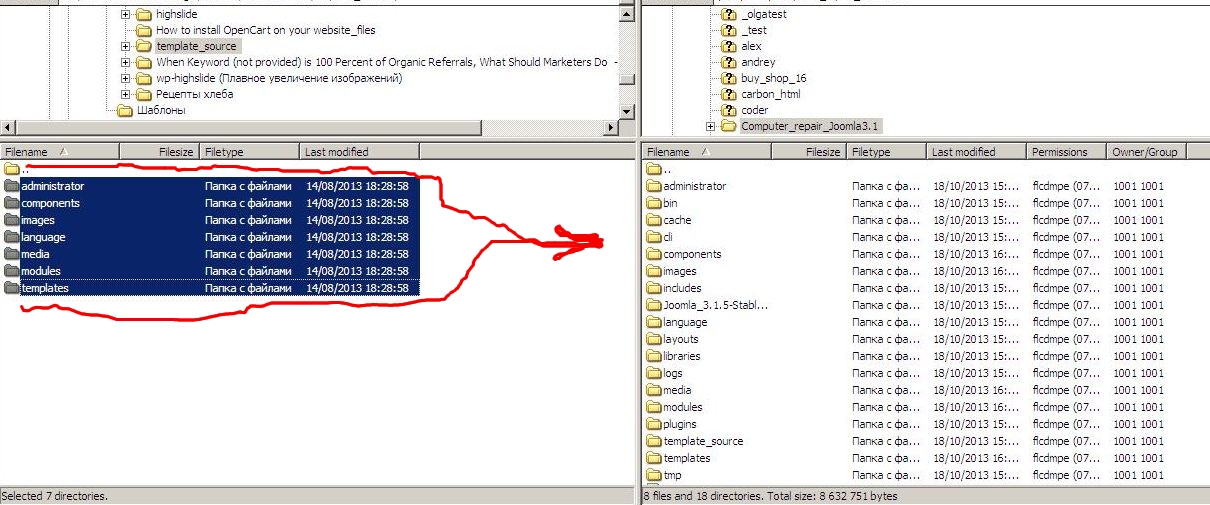
Template_source_small

Template_source_big

On the next step we have to make the database import.
In our case, for this operation we go at the address http://dev3.tonytemplates.com/phpmyadmin
Create the database with the website’s name. In our case –  Computer_repair_Joomla3.1
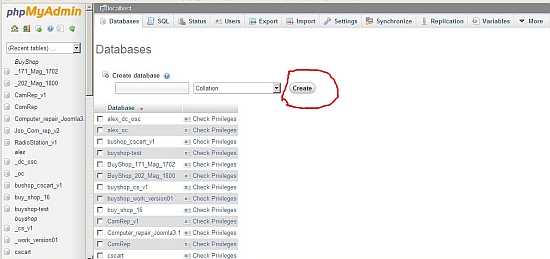

Database_small

Database

Create a new user in the tab “Privilege”.


Privileges_small

Privileges

After switching to the tab “Import”, select a file “sql”- “dump.sql”, which is situated in the site template’s archive, and execute the import.

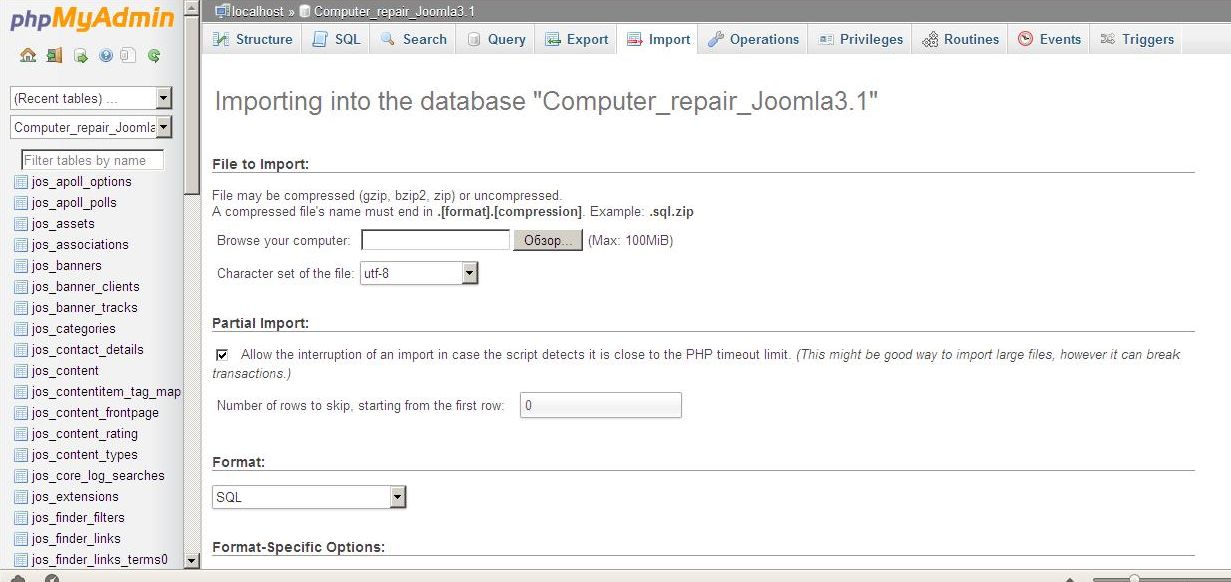
Import of the file small image

Import of the file big image

After the procedure is finished, the message of the database successful import will appear.

Ok. This is all the procedures for installing the template. Now you can admire the finished site.


Computer Repair Joomla3 small screenshot of the main page

Joomla Computer Repair website template installed - big image

If you already have Joomla installed, before the installation of the “Computer Repair” template’s files, you should upload the content of the folder “Template Source” to your server. You have also to make import of the file “dump.sql”

Ok, that’s all for today. In the following articles we will talk about how to perform customization of the product.

See you in the next posts.

Tonytemplates team

Posted in Learning sessions|