Good day dear readers of the “Learning sessions” rubric!
Today’s publication continues the series of articles, which are destined to help customers in their customization questions.
Well, the previous article “4 Quick steps to create new top navigation menu with categories and some custom items in Cs-Cart” talked you about new navigation menu’s creation.
Current post is about Opencart. We’ll teach you how to create SEO-friendly URLs on your Opencart website.
Ok, let’s start.
Nowadays SEO optimisation of any website is as important as its creation. Creation and uploading of your website on some type of hosting isn’t enough for a good and profitable business. Whereas the most important thing is your website’s availability to potential customers. Your web resource has to be correctly indexed by the Search Engines. Web masters use a lot of methods and have to satisfy many rules to achieve this goal.
Among the variety of such methods one of the most important things is creating of the SEO friendly urls. SEO specialists recommend to set friendly urls of your web pages first of all. Different platforms for electronic commerce (e-commerce) offer different functionality of processing urls of pages on your site. Let’s see the mechanism how to do this on the example of a such popular tool as OpenCart.
Well, after installation of your default OpenCart template the best practice is to make usage of friendly urls immediately after this.
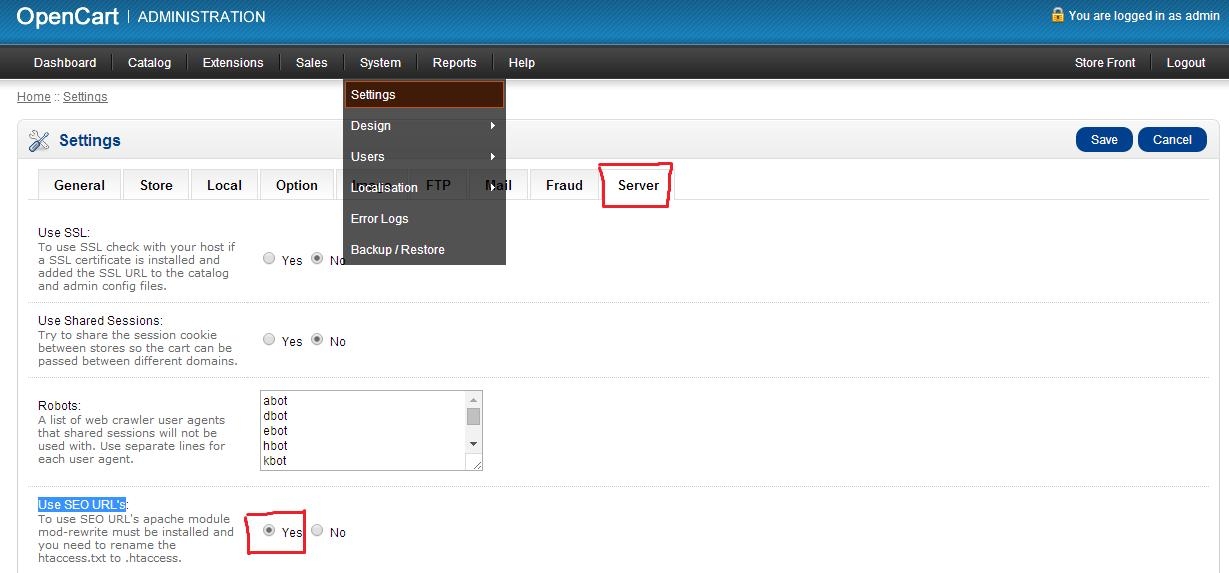
You should go to admin: System -> Settings -> Server -> Use SEO URL’s and set Yes there.